Digital transformation for small business might be the most overused phrase in business technology. It shows up in every vendor deck and every conference keynote, usually next to a picture of a glowing globe. So it’s fair if the phrase makes your eyes glaze over.
The difference isn’t in the language. It’s in whether on-site service means a real person driving to your office today, or a ticket entering a queue somewhere three time zones away.
What on-site service usually means now
“Digital transformation” might be the most overused phrase in business technology. It shows up in every vendor deck and every conference keynote, usually next to a picture of a glowing globe. So it’s fair if the phrase makes your eyes glaze over.
But strip away the buzzwords and the idea is simple: your technology should remove friction from the way your people work, not add it. For most offices with 20 to 200 people, digital transformation for small business doesn’t take a massive project.
Most offices start at the top. That’s the problem.
The exciting part of modern technology is the top layer — AI assistants, automated workflows, dashboards that answer questions on their own. That’s where the attention goes, so that’s where many businesses start.
Then the new tool runs on a Wi-Fi network that drops every afternoon, on laptops two versions behind on security updates, connected to files nobody can find, backed up — maybe — by a drive in a closet. The tool isn’t the problem. The foundation is.
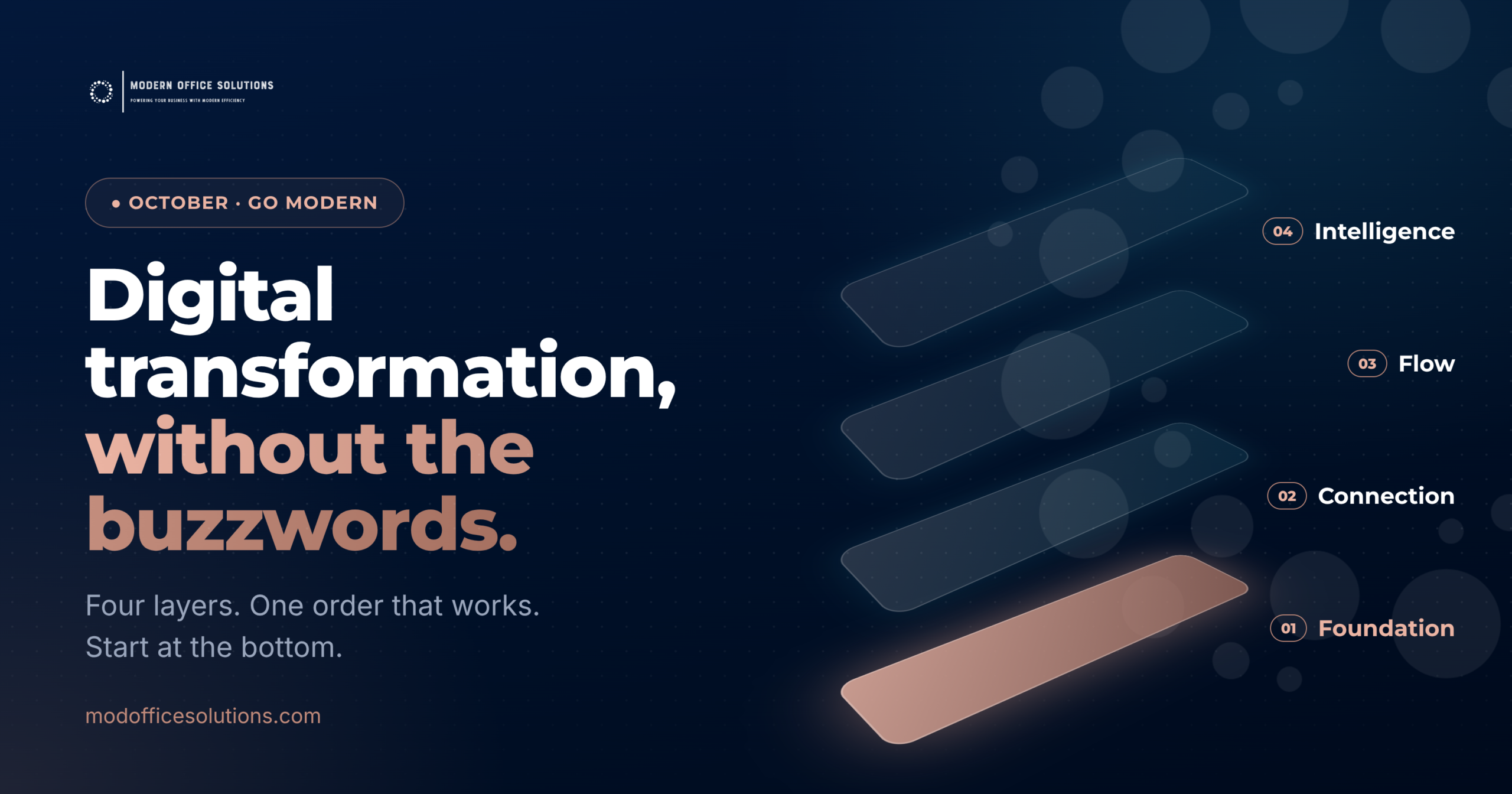
Think of it as a stack. Each layer only works as well as the one underneath it.
Layer 1 — The foundation: network, devices, security, backup
This is the unglamorous layer, and it’s the one that matters most. A business-grade network and firewall. Devices that receive security updates on schedule. Endpoint protection on every machine. Backups that are tested — not assumed — with a plan for what happens if you lose a server, a laptop, or a whole office for a day.
If you only do one thing this quarter, do this one. Every other layer inherits its weaknesses.
| A timely example: on October 13, 2026, several Microsoft deadlines land on the same day. Windows 10’s first year of paid Extended Security Updates ends for businesses — year two costs double. Office 2021 reaches end of support, with no extension available. And Windows Server 2012 and 2012 R2 receive their final security update, ever. If you aren’t sure whether any of those are still running in your office, that’s exactly the foundation question. |
Layer 2 — Connection: phones, collaboration, the cloud
Once the foundation is solid, look at how your people communicate. Is your phone system still a box on the wall, or does it follow people to their laptop and cell? Are teams sharing files over email attachments, or working in the same document? Can someone work from home on Friday without a VPN headache?
Modern unified communications and cloud collaboration tools are mature, affordable, and mostly subscription-based — which means less up-front capital and fewer surprises when something reaches end of life.
Layer 3 — Flow: how documents and approvals move
This is where the paper-to-digital story lives. Invoices that get printed, signed, scanned, and emailed. Contracts that sit on a desk waiting for a signature. Employee files in a cabinet. A document management system turns those into searchable, permissioned, automated workflows — with an audit trail.
It’s also where a print partner and an IT partner overlap the most. Your multifunction printers are scanners, and scanners are the front door to a digital workflow. When the same partner manages both, that front door actually connects to something.
Layer 4 — Intelligence: AI that works on good data
Now AI makes sense. With a secure foundation, connected people, and documents that live in organized systems instead of filing cabinets, AI tools have something real to work with — summarizing, forecasting, spotting anomalies, automating routine steps.
Skip the first three layers, and AI mostly automates confusion.
The hidden cost: five vendors, five handoffs
Here’s the part nobody puts in the slide deck. In a typical small or mid-size office, the four layers are owned by four or five different companies: the printer company, the IT person or firm, the phone vendor, the internet provider, and whoever sold the software licenses.
When something breaks at the seams — the scanner can’t reach the shared folder, the phones drop when the network’s busy, nobody knows who renewed the firewall license — each vendor can honestly say, “That’s not us.” And your office manager becomes the unpaid general contractor of your technology.
We made this point about copier repairs last month: what slows things down isn’t usually the fix, it’s the number of handoffs before anyone owns the problem. Technology works the same way.
Digital Transformation for Small Business: Five Questions to Ask First
• When were our backups last tested — actually restored, not just run?
• Is every computer and server still receiving security updates? Which ones aren’t?
• How many companies do we call when technology breaks, and do they talk to each other?
• Where do our important documents actually live — and could a new hire find them?
• If we added an AI tool tomorrow, what data would it be working with?
If those answers are fuzzy, you don’t need a digital transformation roadmap with a glowing globe on it. Digital transformation for small business starts with a clear picture of the four layers, and someone accountable for all of them.
What this looks like at Modern Office Solutions
Most people know us for copiers and managed print. Fewer know that we’re also a managed IT provider, and that’s by design: the printer is just one more device on your network. We handle the whole stack under one roof — network and server management, endpoint protection, help desk support, backup and disaster recovery, patching, business-grade Wi-Fi and firewalls, cloud and unified communications, document management, and practical AI tools.
That means one partner who sees how the layers connect, one number to call, and nobody saying “that’s not us.”
We’ll start where it makes sense: a free technology assessment that walks through your four layers, flags anything that’s out of support or untested, and gives you a plain-English list of what to fix first — whether or not you ever work with us.
Modern problems require modern thinking. Usually, that starts at the bottom of the stack.
Modern problems require modern thinking. Usually, that starts at the bottom of the stack.
→ Book a free equipment check: contact your Modern Office representative.